
Getting steady traffic and qualified leads is the toughest hurdle for online business owners. Pushing raw sales links directly to people who do not know you rarely gets results, leaving you stuck with wasted effort and no real income.
The solution is simple: share helpful information first. When you offer a short, focused course that teaches a useful skill, you build trust immediately and give prospects a real reason to subscribe to your list.
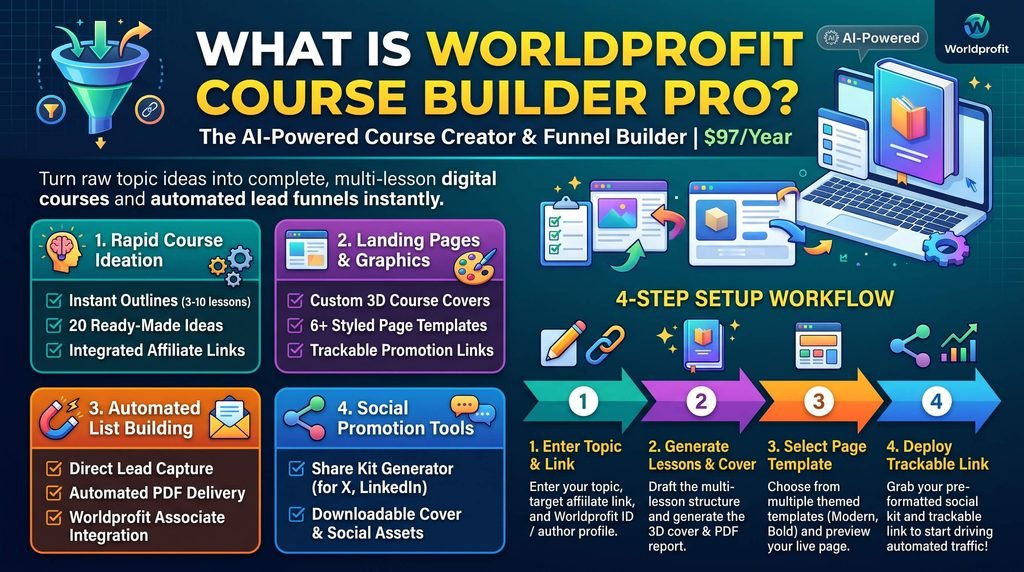
Worldprofit’s Course Builder Pro automates this entire setup. It writes the lessons, designs the book covers, creates the signup pages, and sends out the materials so you can grow your business without technical headaches.
What Is Course Builder Pro?
Course Builder Pro is an automated tool inside the Worldprofit member area that turns any basic idea into a complete digital mini-course. It costs $97 per year and requires no coding, web design, or technical background to use.
Instead of spending weeks writing lessons and setting up complex software, this platform builds the content and delivery system for you in a few quick steps.
Practical Tools to Grow Your Business
1. Simple Course Creation and Setup
- Automatic Lesson Plans: Enter a topic, your target audience, and what you want readers to learn, and the system creates 3 to 10 step-by-step lessons.
- 20 Instant Topic Ideas: If you do not know what to teach, click one button to get 20 ready-to-use course ideas on the spot.
- Built-In Affiliate Links: Add your referral link once during setup. The system places it directly inside every lesson and within the downloadable guide so readers can click and buy.
2. Ready-to-Use Web Pages and Graphics
- Professional 3D Covers: Create clean, attractive cover graphics with one click to make your giveaway look valuable.
- 6+ Page Designs: Choose from over six page styles to collect contact details from visitors without touching any code.
- Tracking Links: Use built-in tracking links to see which promotional posts bring in clicks and signups.
3. Automated Follow-Up and Delivery
- Instant Email Delivery: As soon as someone signs up, the system automatically emails them the lesson details and a finished PDF report.
- Direct Lead Storage: Every subscriber’s information is automatically saved inside your Worldprofit prospect manager under the label “Course Builder”.
- Extra Team Growth: Signups are also invited to join Worldprofit as free associates under your sponsor account, helping you build your team on autopilot.
4. Fast Social Media Promotion
- Ready-Made Posts: Generate written updates for sites like X (Twitter) and LinkedIn that include your trackable link.
- Image Downloads: Download your course cover graphic directly from the screen to pair with your social posts.
4 Simple Steps to Launch
[1. Enter Topic & Link] ➡️ [2. Create Lessons & Cover] ➡️ [3. Pick a Page Style] ➡️ [4. Share Your Link]
- Set Up Your Profile: Add your name, photo, and links so they appear on your course pages and PDF documents.
- Generate the Lessons: Type in your subject or choose from the 20 suggestions, add your affiliate link, and create your cover.
- Select Your Page: Choose the template style you like best and preview how it looks.
- Share and Track: Copy your trackable link and ready-made social posts to start collecting new subscribers.
Key Takeaways
- Fast Setup: Produces a complete 3- to 10-lesson course in minutes without manual writing.
- Affiliate Earnings: Places your promotional links directly inside the course lessons and the PDF report.
- Hands-Free Delivery: Sends the course lessons and downloadable guide to subscribers automatically.
- Two Ways to Grow: Captures direct email leads while introducing prospects to your Worldprofit associate team.
- Affordable Access: Available for an annual membership of $97 per year.
Start Building Your List Today
Sending visitors to basic sales pages rarely works long-term. Giving away useful lessons earns trust, provides real help, and builds your contact list day after day.
Log into your Worldprofit account, click the AI menu, and launch Course Builder Pro. Be sure to check your member dashboard to access your bonus business tools, traffic resources, and marketing guides so you can take action today. Would you like me to tailor the specific hook or examples in this post toward a particular niche (such as real estate, digital marketing, or business auditing), or draft the accompanying social media posts to share it?
- Would you like this blog post adapted to highlight a specific niche, such as real estate referrals or business consulting?
- Should I generate ready-to-post social media updates (for LinkedIn or X/Twitter) using this exact “Referred by Kenneth” voice?
- Do you want to include specific bonus callout boxes for your 500+ eBook vault or Free Mini Blog in the CTA section?



Leave a Reply